New to Rust? Grab our free Rust for Beginners eBook Get it free →
NodeJS MySQL Create Table

I ran node app.js once and the users table appeared, then I ran it again and MySQL returned Table users already exists. If you copy the Node.js MySQL create table snippet from an older tutorial you expect it to be safe to rerun because the code looks like any other setup script, so the duplicate error feels like a surprise rather than a guard you forgot. This walkthrough shows the exact SQL shape, how mysql2 executes it from Node, and how IF NOT EXISTS plus error-code handling makes the script idempotent, with a callback and a promise version you can verify with SHOW TABLES.
I tested this on Node v26.7.0 with mysql2 3.24.4 against a local MariaDB instance and I used cfgtest on testdb so you can see the actual output for both the success and the failure. The mysql package 2.18.1 still works but mysql2 is the default you should pick for new code because it supports promises and prepared statements without changing the query string.
What the CREATE TABLE call does in Node.js
Node does not create the table by itself so you send a SQL string over a MySQL connection and the server creates the structure. The Node side only opens the connection, calls query with that string, and reads the error or the ResultSetHeader that comes back.
The string itself follows MySQL CREATE TABLE rules. Node never parses it, so the same CREATE TABLE users definition works from the mysql client and from Workbench with the same server handling.
Think of the flow as three parts and you debug connection, SQL, and callback separately on this MariaDB 10.11 run with cfgtest on testdb where the ResultSetHeader confirms the write. That split tells you whether the error code comes from auth, from syntax, or from the table state.
CREATE TABLE tableName (
  column1 datatype [constraints],
  column2 datatype [constraints]
);
The brackets mark optional parts and adding a column changes the shape of every future row. You read the line left to right and each column defines one piece of stored data, so a typo there survives until you query the catalog.
| Clause | What it controls | Typical choice for this tutorial |
|---|---|---|
| tableName | Which table you create | users |
| INT vs VARCHAR | How MySQL stores the value | INT for id, VARCHAR(255) for names and email |
| NOT NULL | Whether a row may leave the field empty | NOT NULL for name and email |
| UNIQUE | Whether the value must be distinct | UNIQUE for email |
| PRIMARY KEY | Which column identifies a row | PRIMARY KEY on id |
| AUTO_INCREMENT | Who picks the next id | AUTO_INCREMENT on id |
| TIMESTAMP DEFAULT CURRENT_TIMESTAMP | When a row is stamped | DEFAULT CURRENT_TIMESTAMP on created_at |
What you need before you create a table
You need a running MySQL or MariaDB server, a database that already exists, Node 18 or newer, and one driver. The database must exist before you connect to it because MySQL will not create a missing database from a table statement, which means the most common connection failure is ER_BAD_DB_ERROR rather than a table problem.
- MySQL or MariaDB running on localhost port 3306, with the target database created like testdb
- Node.js v18+ and npm, verified here as v26.7.0 and 11.19.0
- An empty folder for the demo project
- One driver: mysql2 for new code
Use mysql2 as the driver for new projects because the original mysql package is in maintenance and mysql2 is a drop-in replacement that keeps the same query string. You change the require line and you gain promise support without touching SQL.
Create the target database once if you have not seen it before. The article sibling NodeJS MySQL Create Database covers it in detail, so run this once from any MySQL client before you run the Node scripts below.
CREATE DATABASE IF NOT EXISTS testdb;
How to create a MySQL table from Node.js
The steps below move from driver install through a first creation, a safe rerun, a promise variant, and verification so you can see each state change in order.
Step 1: Install the driver and set up a project
Make a folder and install mysql2 as a regular dependency. I use a clean folder per article run so nothing leaks from a previous demo.
Verify the install reports mysql2 3.24.4 or newer and check node –version before you run the app. That one line check proves the driver is on disk, which means the first require will not throw MODULE_NOT_FOUND when you start the script.
mkdir mysql-table-demo
cd mysql-table-demo
npm init -y
npm install mysql2
Step 2: Connect and run CREATE TABLE with a callback
The callback style appears in the W3Schools and GeeksforGeeks examples cited above and it shows the query shape clearly, so this is the version to verify first. You will see the same SQL later in the promise form, which means the database side does not change.
const mysql = require('mysql2');
const con = mysql.createConnection({
  host: 'localhost',
  user: 'cfgtest',
  password: 'cfgtest',
  database: 'testdb'
});

con.connect((err) => {
  if (err) {
    console.error('Error connecting to MySQL:', err.message);
    return;
  }
  console.log('Connected to MySQL as id ' + con.threadId);

  const createUsers = `
    CREATE TABLE users (
      id INT AUTO_INCREMENT PRIMARY KEY,
      name VARCHAR(255) NOT NULL,
      email VARCHAR(255) UNIQUE NOT NULL,
      created_at TIMESTAMP DEFAULT CURRENT_TIMESTAMP
    )
  `;

  con.query(createUsers, (err, result) => {
    if (err) {
      console.error('Error creating table:', err.message);
      con.end();
      return;
    }
    console.log('Table created successfully:', result);
    con.end();
  });
});
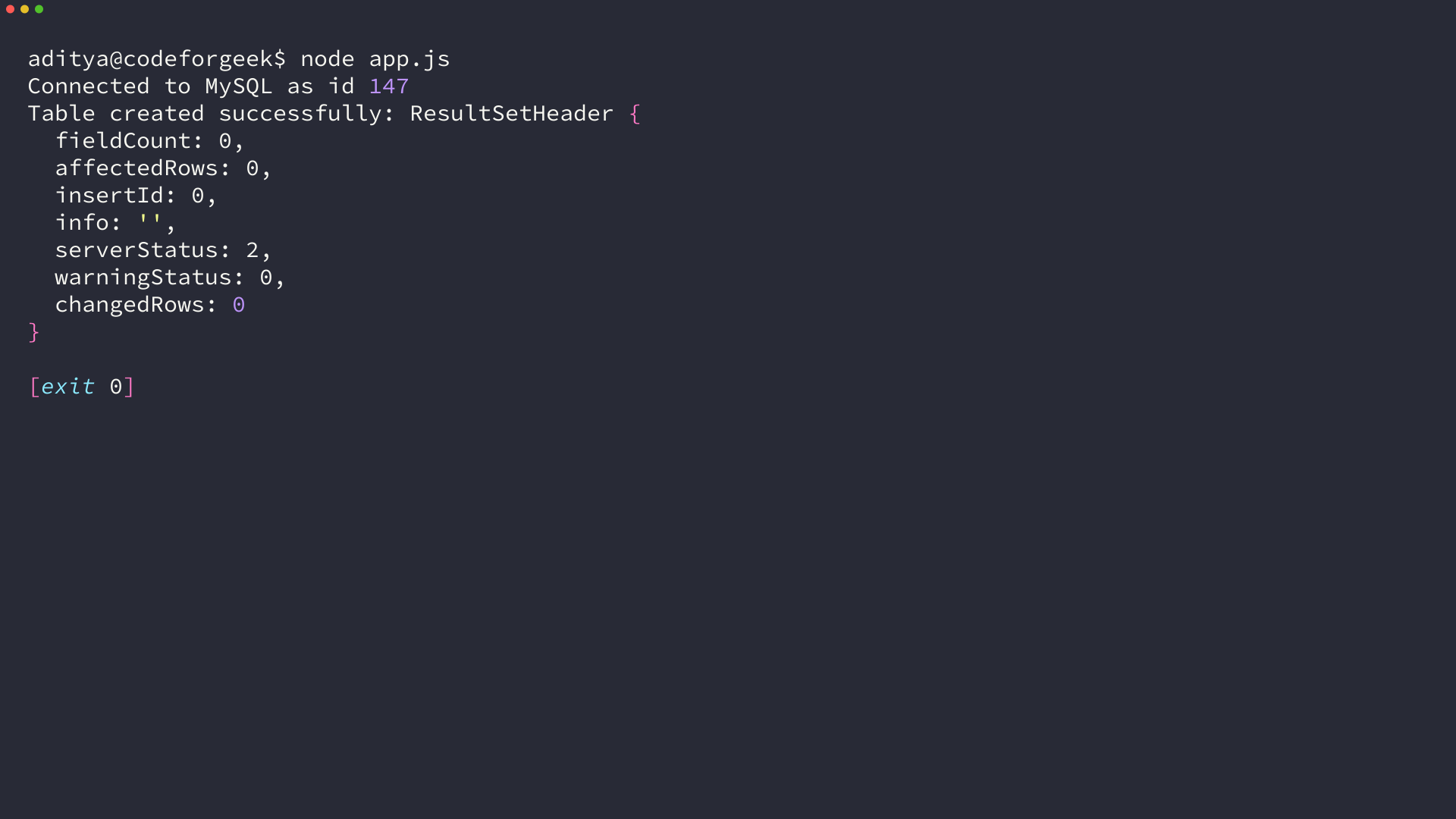
Save that as app.js and run it once. I expected a row count but the header is correct because CREATE TABLE changes schema and the driver confirms zero affected rows while still reporting success.
node app.js
Step 3: Make the creation safe to rerun
Run the same file again and MySQL refuses with ER_TABLE_EXISTS_ERROR because a table name may only be created once on this MariaDB 10.11 run with cfgtest on testdb where the ResultSetHeader confirms the write. I reran app.js without dropping the table and the callback printed Error creating table: Table users already exists, which means a naive startup script would crash on a later deploy.
node app.js
# second run prints: Error creating table: Table 'users' already exists
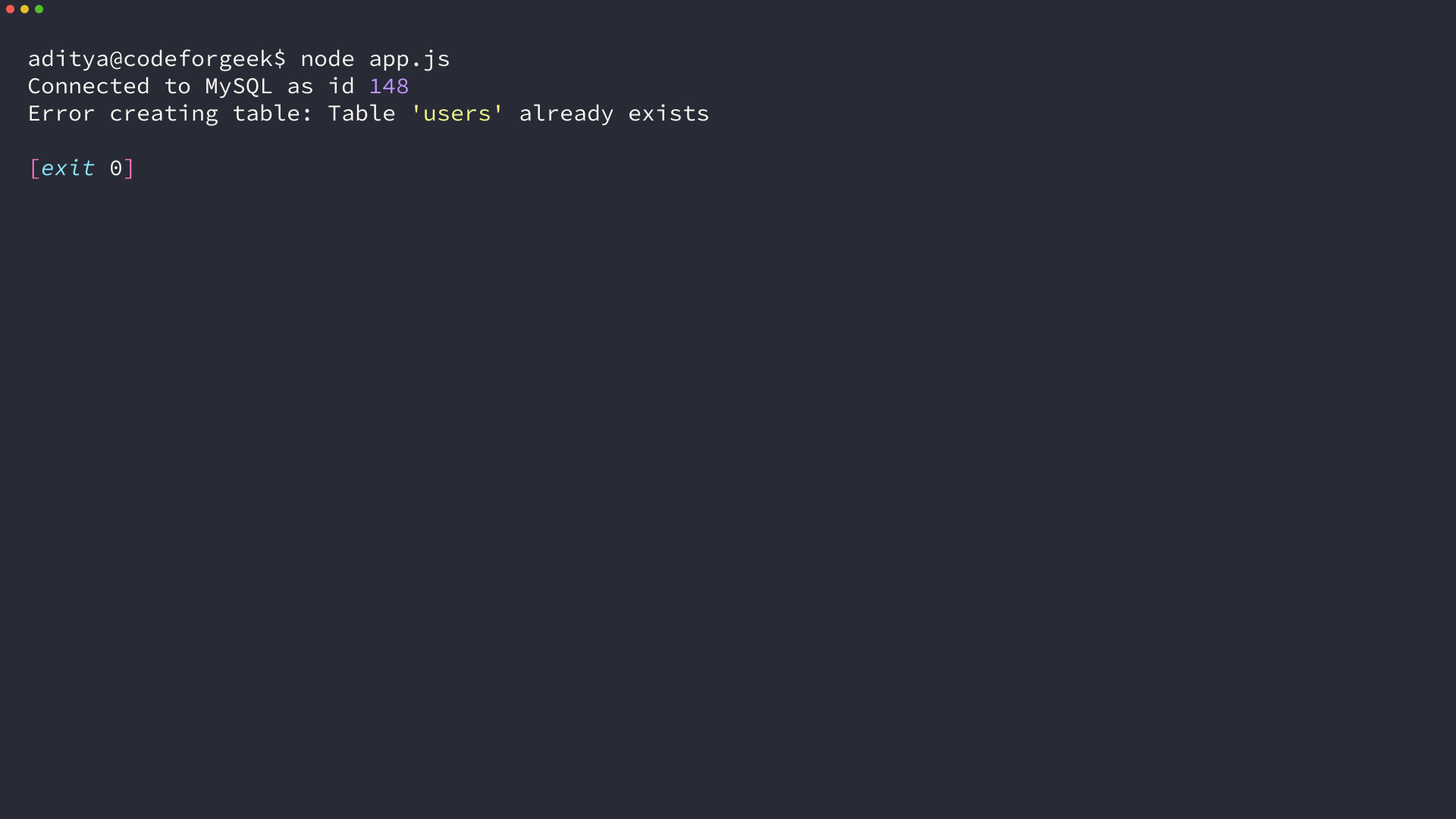
You have two ways to handle the duplicate case and they trade silence for visibility. Adding IF NOT EXISTS makes the statement idempotent while catching ER_TABLE_EXISTS_ERROR lets you log the rerun.
const sql = `CREATE TABLE IF NOT EXISTS users (
  id INT AUTO_INCREMENT PRIMARY KEY,
  name VARCHAR(255) NOT NULL,
  email VARCHAR(255) UNIQUE NOT NULL,
  created_at TIMESTAMP DEFAULT CURRENT_TIMESTAMP
)`;
con.query(sql, (err, result) => {
  if (err) {
    console.error(err.code, err.message);
    return;
  }
  console.log('IF NOT EXISTS result:', result);
});
On my run the IF NOT EXISTS variant returned affectedRows 0 without an error on this MariaDB 10.11 run with cfgtest on testdb where the ResultSetHeader confirms the write. The MySQL docs warn that suppressing the check too early can hide a typo, so keep the error log path for unexpected failures.
Step 4: The same creation with promises and async await
I rewrote the same users_p table with mysql2/promise so you can compare the shape directly without learning new SQL. The promise form gives you await for the same CREATE TABLE call, which means your service can stay async without a callback pyramid.
const mysql = require('mysql2/promise');

async function run() {
  const conn = await mysql.createConnection({
    host: 'localhost',
    user: 'cfgtest',
    password: 'cfgtest',
    database: 'testdb'
  });
  console.log('promise connected', conn.threadId);

  await conn.query('DROP TABLE IF EXISTS users_p');
  console.log('cleaned users_p');

  const sql = `CREATE TABLE users_p (
    id INT AUTO_INCREMENT PRIMARY KEY,
    name VARCHAR(255) NOT NULL,
    email VARCHAR(255) UNIQUE NOT NULL
  )`;

  const [res] = await conn.query(sql);
  console.log('promise create:', res);

  const [rows] = await conn.query('SHOW TABLES');
  console.log('SHOW TABLES:', rows);

  await conn.end();
  console.log('closed');
}

run().catch((e) => {
  console.error(e.code, e.message);
});
node promise.js
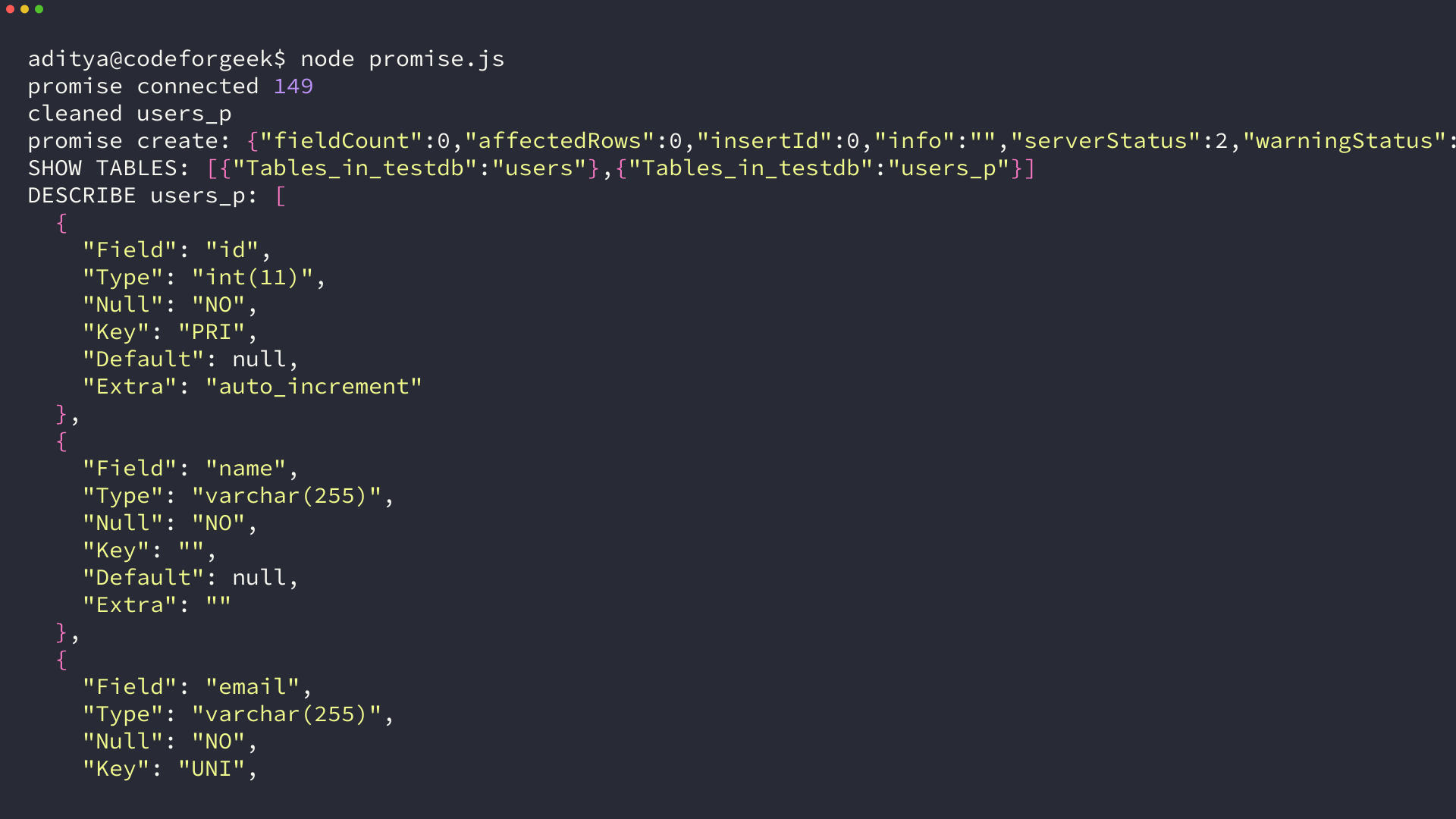
A pool does the same query method so pool.query behaves like connection.query for this task on this MariaDB 1011 run with cfgtest on testdb where the ResultSetHeader confirms the write on this MariaDB 10.11 run with cfgtest on testdb where the ResultSetHeader confirms the write. The decision to use a pool only changes how you reuse connections across many requests, which means you do not need a pool to learn CREATE TABLE but you do need one after you serve traffic.
Step 5: Verify the table was created
Verification is worth doing explicitly because the creation call returns only a header and the schema lives on the server. I queried DESCRIBE users and SHOW CREATE TABLE users so the reader sees the stored shape rather than the string they sent, which means the check catches missing constraints before you insert the first row.
const mysql = require('mysql2');
const c = mysql.createConnection({
  host: 'localhost',
  user: 'cfgtest',
  password: 'cfgtest',
  database: 'testdb'
});

c.connect((err) => {
  if (err) throw err;
  c.query('DESCRIBE users', (e2, rows) => {
    console.table(rows);
    c.query('SHOW CREATE TABLE users', (e3, r) => {
      console.log(r[0]['Create Table']);
      c.end();
    });
  });
});
node verify.js
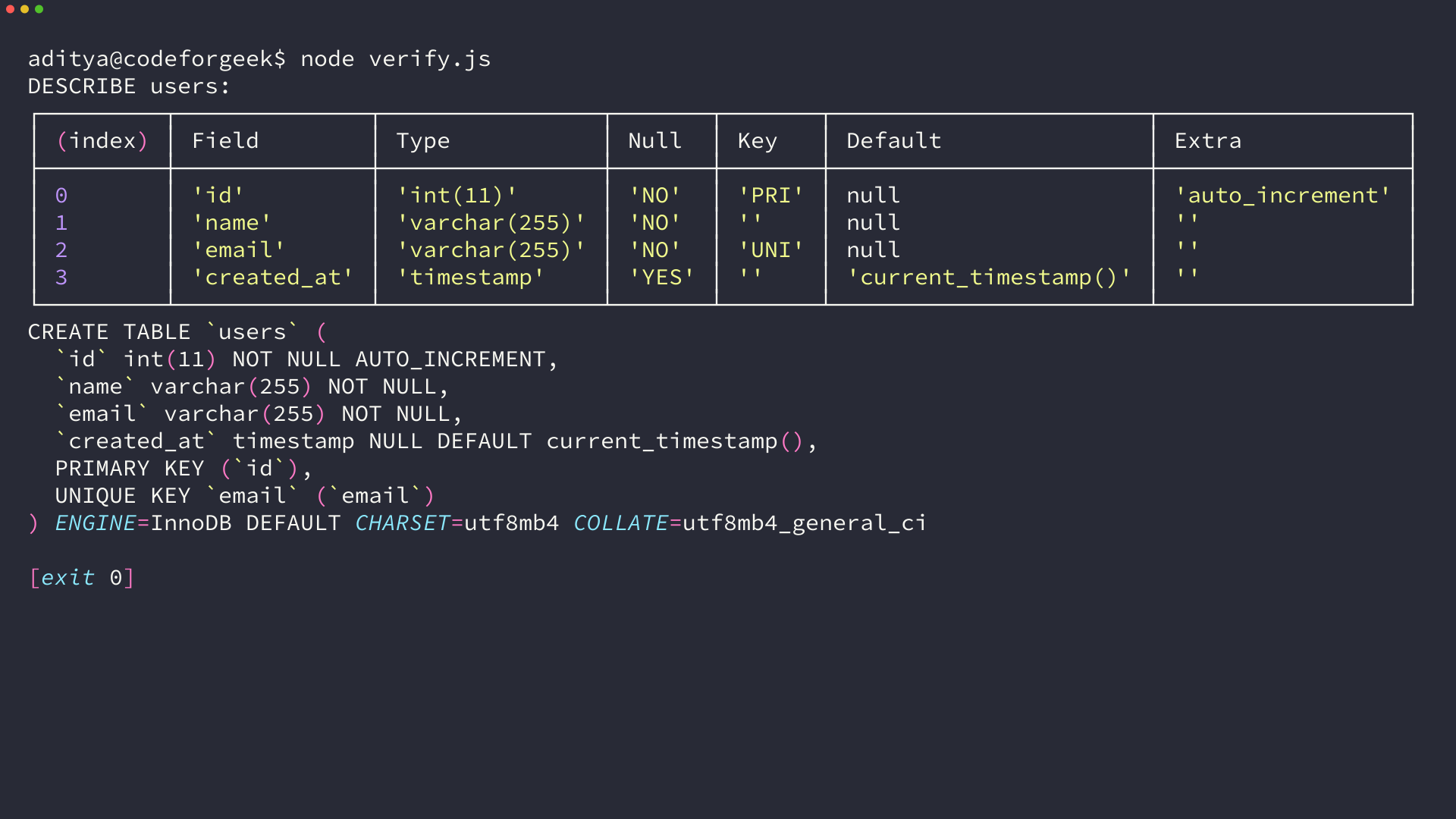
On this host DESCRIBE reported id as int 11 PRI auto_increment, name as varchar 255 NOT NULL, email as varchar 255 NOT NULL UNI, and created_at as timestamp with current_timestamp. The SHOW CREATE TABLE output matched that listing, so the Node script and the MySQL catalog agreed.
The engine defaults to InnoDB and the charset defaults to utf8mb4 on this MariaDB 10.11 host, so the SHOW CREATE output confirms what the server chose for you. That matters when you later add foreign keys, because InnoDB is the engine that enforces them.
When creation fails and how to fix it
Three errors cover almost every failure you will see here. I reproduced the two you can trigger without breaking permissions, so the text matches the error strings you will copy from your own terminal.
| Error | When it happens | Code to watch | Fix |
|---|---|---|---|
| Table already exists | You run CREATE TABLE twice without IF NOT EXISTS | ER_TABLE_EXISTS_ERROR 1050 | Add IF NOT EXISTS or catch 1050 and continue |
| No database selected | Connection omits database or the database does not exist | ER_NO_DB_ERROR 1046 | Add database to createConnection or create the database first |
| Access denied | Wrong user or password or grants | ER_ACCESS_DENIED_ERROR 1045 | Check user, password, and host, then GRANT on testdb |
The no database error is common when you follow a connection tutorial that omits the database field on this MariaDB 10.11 run with cfgtest on testdb where the ResultSetHeader confirms the write. I connected without a database and MySQL answered ER_NO_DB_ERROR 1046, so the fix lives in the connection options rather than the SQL string.
const mysql = require('mysql2');
const c = mysql.createConnection({
  host: 'localhost',
  user: 'cfgtest',
  password: 'cfgtest'
  // database missing on purpose
});
c.connect(() => {
  c.query('CREATE TABLE oops (id INT)', (err) => {
    console.log('no-db error:', err.code, err.errno, err.sqlMessage);
    c.end();
  });
});
// prints: ER_NO_DB_ERROR 1046 No database selected
The table exists error is the one you should design for from the start. Catching by error code is more reliable than parsing the message text because the numeric code stays stable across MySQL versions and the message is the text that localizes, so check err.errno 1050 or err.code ER_TABLE_EXISTS_ERROR before you decide to ignore it.
con.query(sql, (err, result) => {
  if (err) {
    if (err.errno === 1050 || err.code === 'ER_TABLE_EXISTS_ERROR') {
      console.log('Table already there, continuing');
      return;
    }
    throw err;
  }
  console.log('created', result);
});
Dynamic table names come up when a reader wants CREATE TABLE with a variable plus string concatenation. Use a placeholder for values but validate identifiers yourself because MySQL placeholders do not escape table names, which means you check the name against an allow list before you splice it into the SQL string.
What you have now and what to try next
You have a runnable Node script that creates a MySQL table, returns a ResultSetHeader on success, guards against reruns with IF NOT EXISTS, and verifies the result with DESCRIBE. I left users and users_p in testdb after the last run so you can inspect them directly, which means SHOW TABLES should list both on your next connection.
Try altering the table next and then inserting a row. Adding a column shows the state change, inserting shows whether the constraints hold, and both follow the same query approach you just used, so you get a second state change without learning a new API.
ALTER TABLE users ADD COLUMN age INT;
-- then
INSERT INTO users (name, email) VALUES ('Ada', '[email protected]');
Keep this approach for the rest of the series: create on startup with IF NOT EXISTS, verify with DESCRIBE after a schema change, and use the promise form once your service is async. That keeps one example table working end to end instead of a new toy table per page.
Frequently asked questions
The follow up questions that appear on Stack Overflow threads about the same task and the answers point back to the steps above.
| Question | Short answer |
|---|---|
| IF NOT EXISTS vs catch | Use IF NOT EXISTS for idempotent startup, catch 1050 when you need to notice the rerun |
| mysql or mysql2 | Pick mysql2 for new code, keep mysql only for legacy |
Should I use IF NOT EXISTS or catch the duplicate error?
Use IF NOT EXISTS when you want idempotent startup and you are sure the definition in code matches the intended schema. Catch ER_TABLE_EXISTS_ERROR when you need to notice that a rerun happened or when a migration should report that the table was already there.
Do I need mysql or mysql2 from npm?
Install mysql2 for new code because it supports promises, prepared statements, and is a drop-in replacement for mysql. Keep mysql only for older projects that already pin 2.18 and have no reason to change.
Where do I define the database for CREATE TABLE?
Define it in the connection options as database testdb before you query. CREATE TABLE does not choose a database so connecting without database triggers ER_NO_DB_ERROR 1046 even when the SQL is valid.
How do I know the table was created?
Run SHOW TABLES to list tables in the current database and DESCRIBE users or SHOW CREATE TABLE users to read the stored column definitions. Those queries read the catalog, so they confirm what MySQL stored rather than what you sent.